


So – I built an AI Digital Tim to answer questions for me. A nice little side project for my site and the basics of Digital Tim were up and running within a weekend. Functional, cool, but a bit too “Siri” with my face, still workable though. I let a few friends loose on it to see how it behaved, and… yeah. Turns out Digital Tim was more of a concierge – answering on my behalf as opposed to being a “Digital Me”, so it was upgrade time.
Here’s what changed…
1. Going Offline Gracefully
At this point, turning Digital Tim off basically meant pulling the plug and hoping nobody asked him anything. Not the slickest way to go offline by any means.
So I spun up a quick MariaDB table on the NAS (because having a local DB for this kind of thing is perfect) and created a settings table with two values:
- whether the chat should be online
- what message to show when it’s offline
2. Conversation Recording
- The user’s question
- Digital Tim’s answer
- Whether he actually found a relevant response or just gave the “don’t have that yet” fallback
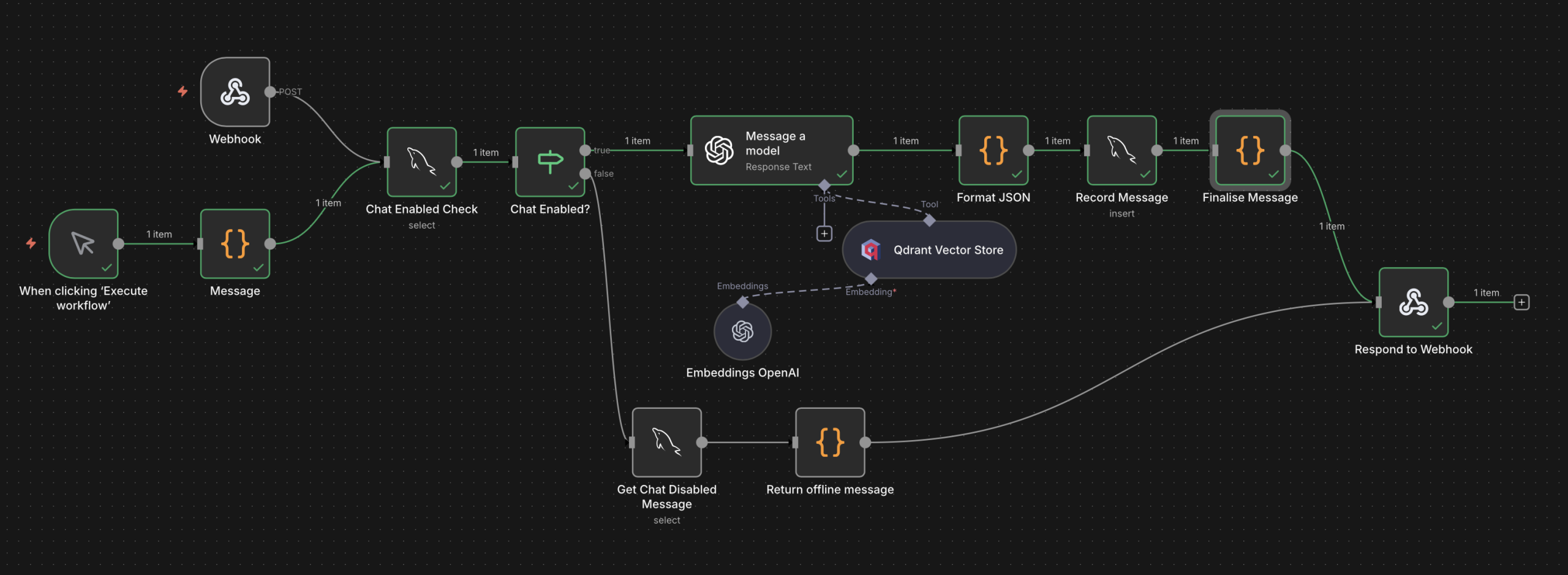
The updated N8N Flow
This bit became immediately useful because as soon as I saw the recorded convos, I realised Digital Tim wasn’t acting like me, he was acting like… my assistant.
If someone asked:
“What do you do for a living?”
A normal Tim answer should be:
“I’m a UX Designer at Booking.com.”
But Digital Tim’s answer?
“Tim is a UX Designer. He works at Booking.com.”
or even…
“I’m Digital Tim, here to answer questions about Tim McKnight”
Erm. Nope. You’re meant to be “me“.
Mentally noted to get that squared in the prompt rewrite.
3. Bringing in the Blog Posts
{
  "type": "blog_post",
  "title": "Example Blog Post",
  "url": "https://worldoftim.com/blog/example",
  "summary": "Short summary of the blog.",
  "tags": ["ai", "coding", "ux", "personal-project"],
  "date": "YYYY-MM-DD"
}
- Persona Q&A’s and / or
- Blog posts
4. Supercharging the Tags
The original tags were OK but they weren’t great! A little too “GCSE-level revision notes” for my liking, and the LLM wasn’t consistently finding the information I’d expected.
There were about 3 – 4 tags per entry, not quite enough for accurate semantic filtering. So instead of manually updating close to 200 Q&As (absolutely not going through that again), I took the vibe-coding route:
I vibe coded a node script that…
Sends each Q&A chunk to GPT -> Gets back 10 – 15 clean, search-friendly tags -> updates the Qdrant payload.
5. The Prompt Rebuild
- Digital Tim should answer like he is me, not my personal assistant.
- He should reference relevant blog posts (but only when they’re actually useful).
- Responses must stick to the JSON schema each and every time.
This is where model selection became important.
GPT-4.1 Mini
The model being used for the initial version
- Fast ✅
- Cheap ✅
- Slips formatting 🚫
- Loves hallucinating non-existent blog posts 🚫
- Obedient ✅
- Follows JSON religiously ✅
- Doesn’t invent blog posts ✅
So Digital Tim now officially runs on GPT-5 Mini and he’s much closer to the original vision.
He now:
- Talks like me (to a degree)
- References blogs properly
- Follows the rules
- Stays in character
- Doesn’t break the JSON schema
6. Final Outcome
After a bunch of tests and tweaks, Digital Tim now behaves like… Digital Tim. He includes blogs when relevant and can track every question he gets asked. This helps me to see where the knowledge gaps are and fill them in where appropriate. As people keep chatting to him (and I keep filling in the blanks) he’ll pick up more context about Real Tim (not “self-aware”, calm down Skynet fans) – just a richer database that makes the responses sharper over time. On top of that, everything’s local on my NAS and reusable for future projects.
Talking of which, if you’ve got ideas for features or upgrades, tell Digital Tim.
He logs everything and he’ll pass it on!






2 comments