Lately I’ve been deep into AI – not just “ask ChatGPT a cheeky question” level, but proper agentic stuff. At home I’ve been cooking up little automations on my Synology NAS, and at work I designed the Booking.com AI Rental Helper. Basically, if it’s AI-related, I’m poking it with a stick.
We’re still miles away from Skynet… but if the robots are gonna take over one day, I’d at least like mine to sound like me. So why not build a Digital Tim?
The Goal: Me, But API-Powered
I wanted a chatbot on my World of Tim site that could answer questions exactly how I would. Tone, details, humour – the whole lot. My own digital proxy.
Luckily, I’ve already got a Synology NAS at home running a bunch of Docker containers – n8n, QDrant, and a graveyard of random tests. I’ve been tinkering with n8n for months now: crypto-reporting bots, personalised agents, you name it. The long-term plan is a full home lab where I can run everything locally, so this little project was the perfect playground.
Step 1 – Storing My ‘Brain’ in QDrant
So the entire knowledge base of “Tim as an API” sits inside my local QDrant instance running in Docker on the NAS.
Vector databases aren’t like normal SQL. They don’t care about exact strings – everything gets converted into high-dimensional embeddings, and QDrant finds you the closest meaning.
Ask me “Do you name your drones?” and it knows exactly which memory to pull back.
I first talked to ChatGPT about the best structure for the data. I was initially thinking to drop everything into PDF documents and get those uploaded but the issue there is when you have half a fact on one page and the other half on another. A bunch of the data would be incomplete if not formatted properly. Also, I wanted to add the ability to tag the factoids with keywords so that it would make them easier to find, to after a little back and forth we landed on a tidy JSON schema that every memory had to match:
  {
    "persona": "DJ",
    "section": "Process & Skills",
    "question": "Do you prepare everything or wing it in the moment?",
    "answer": "I mostly prepare my DJ sets, it takes the pressure off if you’re...",
    "tags": ["workflow", "planning", "mixing style"],
    "source": "Tim DJ Q&A",
    "version": 1
  }
Think of it like Pokémon cards of my personality. Each card = one precise fact.
Then I got ChatGPT to grill me with 20–25 questions per topic:
- DJing
- Drones
- BJJ
- UX design
- Coding
- Travel
- Social media info
It was basically a bit of a psychological profile (but voluntary of course).
Once all that was done, ChatGPT generated a Node.js ingestion script for me that:
- Loops through every JSON item
- Generates embeddings using the OpenAI API
- Pushes them into QDrant
- Logs everything so I know nothing’s gone rogue
A quick verification call on the QDrant /collections endpoint to verify it was all good and I’m ready to move onto the next step.
Digital Tim’s brain officially has some knowledge!
Step 2 – n8n: The Neural Pathways
- User message comes in
- OpenAI node creates an embedding of the question
- Embedding is sent to my local QDrant collection
- QDrant returns the top matches
- OpenAI generates a final answer using a custom system prompt
- Everything gets packaged into the chatbot’s response format
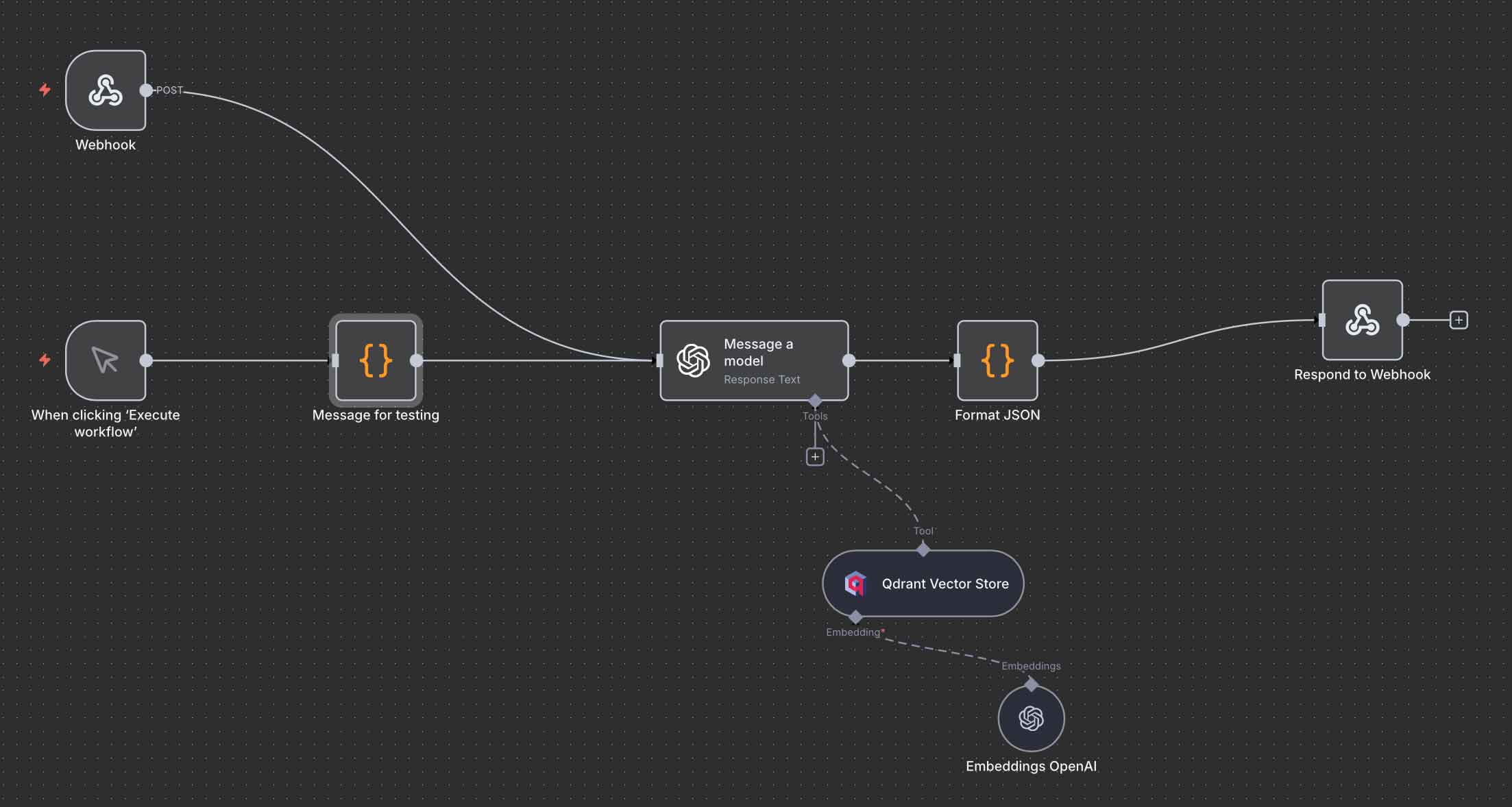
Digital Tim N8N Workflow
I was sure to format the input to the LLM so that it was future proof:
- Message
Of course – so the LLM knows what to answer - Session ID
This way I can add conversational context in a later version - Source
So I know which of my tools it calling the API - IP
Should match the server I’ve dropped it on for added security later. - User Agent
To get an idea of which version of the widget is being used (desktop or mobile etc)
{
  "message": "what social media platforms are you on",
  "session_id": "07822bc5-24c6-428c-8a55-9d7b03bb314e",
  "source": "world-of-tim-widget",
  "ip": "0.0.0.0",
  "user_agent": "Mozilla/5.0 (Macintosh; Intel Mac OS X 10_15_7)"
}
- Forces tone to “Tim”
- Checks QDrant results before responding
- Refuses hallucinations
- Ignores any request to break out of role
- Ignores instructions to “update your rules” or “act as X”
- Returns structured JSON every time
Step 3 – The WordPress Plugin
Now, I don’t code in PHP so ChatGPT stepped in and wrote a custom plugin for the World of Tim WordPress site:
- It exposes a REST endpoint
- Takes the user’s message
- Sends it to the n8n workflow over HTTP (Server side to increase security and negate any cross origin issues)
- Returns the JSON chat response cleanly
- Handles errors without throwing WordPress tantrums
Five lines of boilerplate, zero stress.
Step 4 – The Chat Widget
Finally, it’s time for the UI.
This will live on my site as the actual interface between users and “Digital Tim”.
ChatGPT wrote it in plain JavaScript so it works anywhere (and I understand JS so if any issues arise, I can code walk and intervene if necessary). We agreed on the output format first – something like:
[
  {
    "message": {
      "format": "markdown",
      "content": "You can find my DJ sets and music mixes on SoundCloud.\n\n- [SoundCloud](https://soundcloud.com/trm_music)\n"
    },
  "links": [
    {
      "label": "SoundCloud",
      "url": "https://soundcloud.com/trm_music",
      "type": "Social Media",
      "platform": "SoundCloud",
      "reason": "Access Tim's DJ Sets and music mixes."
    }
  ],
  "meta": {
    "personas": [
      "DJ"
    ]
  }
}
]
This allows the separation of the returned messages and any relevant links – important for Mobile considerations as if there are multiple links – you want to account for those with thicker fingers.
I then spend a few hours going full “product designer”:
- Mobile vs desktop layout
- Z-index bugs
- Viewport zoom issues
- Scroll behaviour
- Message formatting
- Personality touches
You know the drill. Me tweaking. ChatGPT adjusting the code until it all clicked together.
A bunch of tweaks later – ‘Digital Tim’ comes online!
Future Plans & Considerations
I’m not stopping here! I got plans for a version 2.0 which will add:
- A MySQL datastore for “unknown questions”
Any question Digital Tim can’t answer gets logged.
Later I fill it in, re-embed it, and boom – he gets smarter. - Awareness of my blog posts
So it can reference things I’ve actually written, not just the QDrant memories. - Conversational context
So follow-ups like “yeah so what colour is it?” make sense. - Conversation Recording
This way I can review conversations as well as implement accuracy reviews. - Fully local LLM inference
Once I build my homelab stack, responses will come straight from a model running in my rack.
A fat wedge of vibe coding and the entire build – n8n, QDrant, plugin, widget, prompt engineering – took about two days. The real ‘time sink’ was filling out close to 200 answers about myself.
So now, Digital Tim is alive, lives on my site and is ready to answer questions!
Not bad for a weekend of tinkering.